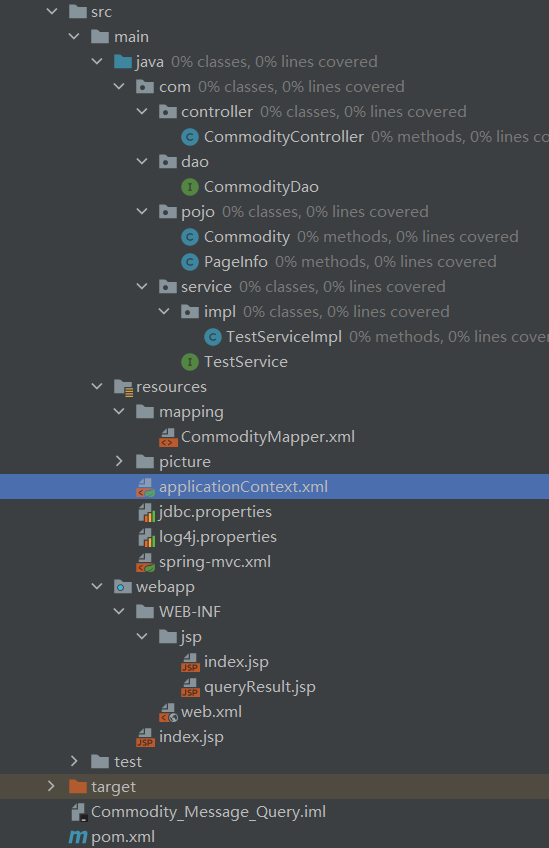
开始 项目目录
pom.xml 主要描述项目的maven坐标,依赖关系,开发者需要遵循的规则,缺陷管理系统,组织和licenses,以及其他所有的项目相关因素。
1 2 3 4 5 6 7 8 9 10 11 12 13 14 15 16 17 18 19 20 21 22 23 24 25 26 27 28 29 30 31 32 33 34 35 36 37 38 39 40 41 42 43 44 45 46 47 48 49 50 51 52 53 54 55 56 57 58 59 60 61 62 63 64 65 66 67 68 69 70 71 72 73 74 75 76 77 78 79 80 81 82 83 84 85 86 87 88 89 90 91 92 93 94 95 96 97 98 99 100 101 102 103 104 105 106 107 108 109 110 111 112 113 114 115 116 117 118 119 120 121 122 123 124 125 126 127 128 129 130 131 132 133 134 135 136 137 138 139 140 141 142 143 144 145 146 147 148 149 <properties > <project.build.sourceEncoding > UTF-8</project.build.sourceEncoding > <maven.compiler.source > 1.7</maven.compiler.source > <maven.compiler.target > 1.7</maven.compiler.target > <srping.version > 4.0.2.RELEASE</srping.version > <mybatis.version > 3.2.8</mybatis.version > <slf4j.version > 1.7.12</slf4j.version > <log4j.version > 1.2.17</log4j.version > <druid.version > 1.0.9</druid.version > </properties > <dependencies > <dependency > <groupId > junit</groupId > <artifactId > junit</artifactId > <version > 4.11</version > <scope > test</scope > </dependency > <dependency > <groupId > org.springframework</groupId > <artifactId > spring-test</artifactId > <version > ${srping.version}</version > </dependency > <dependency > <groupId > org.springframework</groupId > <artifactId > spring-core</artifactId > <version > ${srping.version}</version > </dependency > <dependency > <groupId > org.springframework</groupId > <artifactId > spring-oxm</artifactId > <version > ${srping.version}</version > </dependency > <dependency > <groupId > org.springframework</groupId > <artifactId > spring-tx</artifactId > <version > ${srping.version}</version > </dependency > <dependency > <groupId > org.springframework</groupId > <artifactId > spring-jdbc</artifactId > <version > ${srping.version}</version > </dependency > <dependency > <groupId > org.springframework</groupId > <artifactId > spring-aop</artifactId > <version > ${srping.version}</version > </dependency > <dependency > <groupId > org.springframework</groupId > <artifactId > spring-context</artifactId > <version > ${srping.version}</version > </dependency > <dependency > <groupId > org.springframework</groupId > <artifactId > spring-context-support</artifactId > <version > ${srping.version}</version > </dependency > <dependency > <groupId > org.springframework</groupId > <artifactId > spring-expression</artifactId > <version > ${srping.version}</version > </dependency > <dependency > <groupId > org.springframework</groupId > <artifactId > spring-orm</artifactId > <version > ${srping.version}</version > </dependency > <dependency > <groupId > org.springframework</groupId > <artifactId > spring-web</artifactId > <version > ${srping.version}</version > </dependency > <dependency > <groupId > org.springframework</groupId > <artifactId > spring-webmvc</artifactId > <version > ${srping.version}</version > </dependency > <dependency > <groupId > org.mybatis</groupId > <artifactId > mybatis</artifactId > <version > ${mybatis.version}</version > </dependency > <dependency > <groupId > org.mybatis</groupId > <artifactId > mybatis-spring</artifactId > <version > 1.2.2</version > </dependency > <dependency > <groupId > mysql</groupId > <artifactId > mysql-connector-java</artifactId > <version > 5.1.35</version > </dependency > <dependency > <groupId > commons-dbcp</groupId > <artifactId > commons-dbcp</artifactId > <version > 1.4</version > </dependency > <dependency > <groupId > jstl</groupId > <artifactId > jstl</artifactId > <version > 1.2</version > </dependency > <dependency > <groupId > log4j</groupId > <artifactId > log4j</artifactId > <version > ${log4j.version}</version > </dependency > <dependency > <groupId > org.slf4j</groupId > <artifactId > slf4j-api</artifactId > <version > ${slf4j.version}</version > </dependency > <dependency > <groupId > org.slf4j</groupId > <artifactId > slf4j-log4j12</artifactId > <version > ${slf4j.version}</version > </dependency > <dependency > <groupId > com.alibaba</groupId > <artifactId > druid</artifactId > <version > ${druid.version}</version > </dependency > <dependency > <groupId > commons-fileupload</groupId > <artifactId > commons-fileupload</artifactId > <version > 1.3.3</version > </dependency > <dependency > <groupId > commons-io</groupId > <artifactId > commons-io</artifactId > <version > 2.4</version > </dependency > </dependencies >
log4j.properties 1 2 3 4 5 6 7 8 9 10 11 log4j.rootLogger =debug,stdout,D,E log4j.appender.stdout =org.apache.log4j.ConsoleAppender log4j.appender.stdout.Target = System.out log4j.appender.stdout.layout =org.apache.log4j.PatternLayout log4j.appender.stdout.layout.ConversionPattern =%d{yyyy-MM-dd HH:mm:ss,SSS} -[%p] method:[%c (%rms)] - %m%n
jdbc.properties 数据库配置文件,设置数据库连接信息。
1 2 3 4 5 6 7 8 9 10 11 12 13 14 driver =com.mysql.jdbc.Driver url =jdbc:mysql://localhost:3306/j2ee?characterEncoding=utf8&useSSL=false username =J2EE password =lz2001031910167 initialSize =0 maxActive =20 maxIdle =20 minIdle =1 maxWait =60000
applicationContext.xml Spring配置文件,借助IOC创建对象,引入数据库配置文件采用数据库连接池进行连接,实现MyBatis映射文件的扫描。
1 2 3 4 5 6 7 8 9 10 11 12 13 14 15 16 17 18 19 20 21 22 23 24 25 26 27 28 29 30 31 32 33 34 35 36 37 38 39 40 41 42 43 44 45 46 <?xml version="1.0" encoding="UTF-8" ?> <beans xmlns ="http://www.springframework.org/schema/beans" xmlns:xsi ="http://www.w3.org/2001/XMLSchema-instance" xmlns:tx ="http://www.springframework.org/schema/tx" xmlns:context ="http://www.springframework.org/schema/context" xsi:schemaLocation ="http://www.springframework.org/schema/beans http://www.springframework.org/schema/beans/spring-beans-3.1.xsd http://www.springframework.org/schema/tx http://www.springframework.org/schema/tx/spring-tx.xsd http://www.springframework.org/schema/context http://www.springframework.org/schema/context/spring-context.xsd" > <bean id ="propertyConfigurer" class ="org.springframework.beans.factory.config.PropertyPlaceholderConfigurer" > <property name ="location" value ="classpath:jdbc.properties" /> </bean > <bean id ="dataSource" class ="com.alibaba.druid.pool.DruidDataSource" > <property name ="driverClassName" value ="${driver}" /> <property name ="url" value ="${url}" /> <property name ="username" value ="${username}" /> <property name ="password" value ="${password}" /> </bean > <bean id ="sqlSessionFactory" class ="org.mybatis.spring.SqlSessionFactoryBean" > <property name ="dataSource" ref ="dataSource" /> <property name ="typeAliasesPackage" value ="com.pojo" /> <property name ="mapperLocations" value ="classpath:mapping/*.xml" /> </bean > <bean class ="org.mybatis.spring.mapper.MapperScannerConfigurer" > <property name ="sqlSessionFactoryBeanName" value ="sqlSessionFactory" /> <property name ="basePackage" value ="com.dao" /> </bean > <bean id ="transactionManager" class ="org.springframework.jdbc.datasource.DataSourceTransactionManager" > <property name ="dataSource" ref ="dataSource" /> </bean > </beans >
spring-mvc.xml Spring MVC的配置文件,实现控制器的扫描和视图解析器的配置等操作。
1 2 3 4 5 6 7 8 9 10 11 12 13 14 15 16 17 18 19 20 21 22 23 24 25 26 27 28 29 30 31 32 33 34 35 36 <?xml version="1.0" encoding="UTF-8" ?> <beans xmlns ="http://www.springframework.org/schema/beans" xmlns:xsi ="http://www.w3.org/2001/XMLSchema-instance" xmlns:context ="http://www.springframework.org/schema/context" xmlns:mvc ="http://www.springframework.org/schema/mvc" xsi:schemaLocation ="http://www.springframework.org/schema/beans http://www.springframework.org/schema/beans/spring-beans.xsd http://www.springframework.org/schema/context http://www.springframework.org/schema/context/spring-context.xsd http://www.springframework.org/schema/mvc http://www.springframework.org/schema/mvc/spring-mvc-3.0.xsd" > <context:component-scan base-package ="com" /> <mvc:annotation-driven /> <mvc:default-servlet-handler /> <bean class ="org.springframework.web.servlet.view.InternalResourceViewResolver" > <property name ="viewClass" value ="org.springframework.web.servlet.view.JstlView" /> <property name ="prefix" value ="/WEB-INF/jsp/" /> <property name ="suffix" value =".jsp" /> </bean > <bean id ="multipartResolver" class ="org.springframework.web.multipart.commons.CommonsMultipartResolver" > <property name ="defaultEncoding" value ="UTF-8" > </property > <property name ="maxUploadSize" value ="2097152" > </property > </bean > </beans >
web.xml 实现Spring的加载和Spring MVC前端控制器的配置以及编码自动转换过滤器等配置。
1 2 3 4 5 6 7 8 9 10 11 12 13 14 15 16 17 18 19 20 21 22 23 24 25 26 27 28 29 30 31 32 33 34 35 36 37 38 39 40 41 42 43 44 45 46 47 48 49 50 51 52 53 54 55 56 57 58 59 60 <web-app xmlns ="http://xmlns.jcp.org/xml/ns/javaee" xmlns:xsi ="http://www.w3.org/2001/XMLSchema-instance" xsi:schemaLocation ="http://xmlns.jcp.org/xml/ns/javaee http://xmlns.jcp.org/xml/ns/javaee/web-app_3_1.xsd" version ="3.1" > <display-name > Archetype Created Web Application</display-name > <welcome-file-list > <welcome-file > index.jsp</welcome-file > </welcome-file-list > <listener > <listener-class > org.springframework.web.context.ContextLoaderListener</listener-class > </listener > <context-param > <param-name > contextConfigLocation</param-name > <param-value > classpath:applicationContext.xml</param-value > </context-param > <filter > <filter-name > CharacterEncodingFilter</filter-name > <filter-class > org.springframework.web.filter.CharacterEncodingFilter</filter-class > <init-param > <param-name > encoding</param-name > <param-value > utf-8</param-value > </init-param > <init-param > <param-name > forceEncoding</param-name > <param-value > true</param-value > </init-param > </filter > <filter-mapping > <filter-name > CharacterEncodingFilter</filter-name > <url-pattern > /*</url-pattern > </filter-mapping > <servlet > <servlet-name > springmvc</servlet-name > <servlet-class > org.springframework.web.servlet.DispatcherServlet</servlet-class > <init-param > <param-name > contextConfigLocation</param-name > <param-value > classpath:spring-mvc.xml</param-value > </init-param > <load-on-startup > 1</load-on-startup > <async-supported > true</async-supported > </servlet > <servlet-mapping > <servlet-name > springmvc</servlet-name > <url-pattern > /</url-pattern > </servlet-mapping > </web-app >
配置Tomcat Commodity.java 数据库表对应的映射类
1 2 3 4 5 6 7 8 9 10 11 12 13 14 15 16 17 18 19 20 21 22 23 24 25 26 27 28 29 30 31 32 33 34 35 36 37 38 39 40 41 42 43 44 45 46 47 48 49 50 51 52 53 54 55 56 57 58 59 60 61 62 63 64 65 66 67 package com.pojo;public class Commodity { private int id; private String name; private double price; private int remainNumber; private int soldOutNumber; private String description; private String picture; public void setId (int id) { this .id = id; } public int getId () { return id; } public void setName (String name) { this .name = name; } public String getName () { return name; } public void setPrice (double price) { this .price = price; } public double getPrice () { return price; } public void setRemainNumber (int remainNumber) { this .remainNumber = remainNumber; } public int getRemainNumber () { return remainNumber; } public void setSoldOutNumber (int soldOutNumber) { this .soldOutNumber = soldOutNumber; } public int getSoldOutNumber () { return soldOutNumber; } public void setDescription (String description) { this .description = description; } public String getDescription () { return description; } public void setPicture (String picture) { this .picture = picture; } public String getPicture () { return picture; } }
PageInfo.java 1 2 3 4 5 6 7 8 9 10 11 12 13 14 15 16 17 18 19 20 21 22 23 24 25 26 27 28 29 30 31 32 33 34 35 36 37 38 39 40 41 42 43 44 45 46 47 48 49 50 51 52 53 54 55 56 57 58 59 60 61 62 63 64 65 66 67 68 69 70 71 72 73 74 package com.pojo;import java.util.List;public class PageInfo <T>{ private int totalCount; private int size; private int totalPage; private int currentPage; private List<T> list; public List<T> getList () { return list; } public void setList (List<T> list) { this .list = list; } public int getTotalCount () { return totalCount; } public void setTotalCount (int totalCount) { this .totalCount = totalCount; } public int getSize () { return size; } public void setSize (int size) { this .size = size; } public int getTotalPage () { return totalPage; } public void setTotalPage (int totalPage) { this .totalPage = totalPage; } public int getCurrentPage () { return currentPage; } public void setCurrentPage (int currentPage) { this .currentPage = currentPage; } @Override public String toString () { return "PageInfo{" + "list=" + list + ", totalCount=" + totalCount + ", size=" + size + ", totalPage=" + totalPage + ", currentPage=" + currentPage + '}' ; } }
CommodityDao.java 操作数据库的接口
1 2 3 4 5 6 7 8 9 10 11 12 13 14 15 package com.dao;import com.pojo.Commodity;import org.apache.ibatis.annotations.Param;import java.util.List;public interface CommodityDao { List<Commodity> selectAll () ; List<Commodity> selectAllLimit (@Param("start") int start, @Param("size") int size) ; Commodity selectByPrimaryKey (int id) ; List<Commodity> selectByName (String name) ; boolean insert (Commodity commodity) ; boolean deleteByPrimaryKey (int id) ; }
CommodityMapper.xml MyBatis映射文件
1 2 3 4 5 6 7 8 9 10 11 12 13 14 15 16 17 18 19 20 21 22 23 24 25 26 27 28 29 30 31 32 33 34 35 36 37 38 39 40 41 42 43 44 45 <?xml version="1.0" encoding="UTF-8" ?> <!DOCTYPE mapper PUBLIC "-//mybatis.org//DTD Mapper 3.0//EN" "http://mybatis.org/dtd/mybatis-3-mapper.dtd" > <mapper namespace ="com.dao.CommodityDao" > <resultMap id ="BaseResultMap" type ="com.pojo.Commodity" > <id column ="id" property ="id" jdbcType ="INTEGER" /> <result column ="name" property ="name" jdbcType ="VARCHAR" /> <result column ="price" property ="price" jdbcType ="DOUBLE" /> <result column ="remainNumber" property ="remainNumber" jdbcType ="INTEGER" /> <result column ="soldOutNumber" property ="soldOutNumber" jdbcType ="INTEGER" /> <result column ="description" property ="description" jdbcType ="VARCHAR" /> <result column ="picture" property ="picture" jdbcType ="VARCHAR" /> </resultMap > <sql id ="Base_Column_List" > id, name, price, remainNumber, soldOutNumber, description, picture </sql > <select id ="selectAll" resultMap ="BaseResultMap" > select * from commodity_1029 </select > <select id ="selectAllLimit" resultMap ="BaseResultMap" > select * from commodity_1029 limit #{start},#{size} </select > <select id ="selectByPrimaryKey" resultMap ="BaseResultMap" parameterType ="java.lang.Integer" > select <include refid ="Base_Column_List" /> from commodity_1029 where id = #{id,jdbcType=INTEGER} </select > <select id ="selectByName" resultMap ="BaseResultMap" parameterType ="java.lang.String" > select <include refid ="Base_Column_List" /> from commodity_1029 where name like CONCAT("%",#{name ,jdbcType=VARCHAR},"%") </select > <delete id ="deleteByPrimaryKey" parameterType ="java.lang.Integer" > delete from commodity_1029 where id = #{id,jdbcType=INTEGER} </delete > <insert id ="insert" parameterType ="com.pojo.Commodity" > insert into commodity_1029 (id, name, price,remainNumber,soldOutNumber, description,picture) values (#{id,jdbcType=INTEGER}, #{name,jdbcType=VARCHAR}, #{price,jdbcType=DOUBLE}, #{remainNumber,jdbcType=INTEGER},#{soldOutNumber,jdbcType=INTEGER},#{description,jdbcType=VARCHAR}, #{picture,jdbcType=VARCHAR}) </insert > </mapper >
TestService.java 业务逻辑层接口
1 2 3 4 5 6 7 8 9 10 11 12 13 14 package com.service;import com.pojo.Commodity;import com.pojo.PageInfo;import java.util.List;public interface TestService { boolean insert (Commodity commodity) ; boolean delete (Commodity commodity) ; List<Commodity> queryOne (Commodity commodity) ; List<Commodity> queryAll () ; PageInfo<Commodity> queryByPage (int currentPage) ; }
TestServiceImpl.java 1 2 3 4 5 6 7 8 9 10 11 12 13 14 package com.service;import com.pojo.Commodity;import com.pojo.PageInfo;import java.util.List;public interface TestService { boolean insert (Commodity commodity) ; boolean delete (Commodity commodity) ; List<Commodity> queryOne (Commodity commodity) ; List<Commodity> queryAll () ; PageInfo<Commodity> queryByPage (int currentPage) ; }
CommodityController.java 控制器类
1 2 3 4 5 6 7 8 9 10 11 12 13 14 15 16 17 18 19 20 21 22 23 24 25 26 27 28 29 30 31 32 33 34 35 36 37 38 39 40 41 42 43 44 45 46 47 48 49 50 51 52 53 54 55 56 57 58 59 60 61 62 63 64 65 66 67 68 69 70 71 72 73 74 75 76 77 78 79 package com.controller;import com.pojo.Commodity;import com.service.TestService;import org.springframework.beans.factory.annotation.Autowired;import org.springframework.stereotype.Controller;import org.springframework.ui.Model;import org.springframework.web.bind.annotation.RequestMapping;import org.springframework.web.bind.annotation.RequestMethod;import org.springframework.web.bind.annotation.RequestParam;import org.springframework.web.multipart.MultipartFile;import org.springframework.web.servlet.ModelAndView;import javax.servlet.http.HttpServletRequest;import java.io.File;import java.io.IOException;@Controller @RequestMapping("/commodity") public class CommodityController { @Autowired private TestService testService; @RequestMapping("/index") public String display (Model model, @RequestParam(defaultValue = "1") int currentPage, HttpServletRequest request) { String str=request.getParameter("pageNo" ); if (str!=null ){ currentPage= Integer.parseInt(str); } int pageCount=testService.queryByPage(currentPage).getTotalPage(); int pagePrev=currentPage>1 ?currentPage-1 :1 ; int pageNext=currentPage<pageCount?currentPage+1 :pageCount; model.addAttribute("commoditys" ,testService.queryByPage(currentPage).getList()); model.addAttribute("pageNo" , currentPage); model.addAttribute("pageCount" , pageCount); model.addAttribute("pageNow" , currentPage); model.addAttribute("pagePrev" , pagePrev); model.addAttribute("pageNext" , pageNext); return "index" ; } @RequestMapping(value = "/query",method = RequestMethod.POST) public String queryOne (Commodity commodity,Model model) { model.addAttribute("queryCommoditys" ,testService.queryOne(commodity)); return "queryResult" ; } @RequestMapping(value = "/delete",method = RequestMethod.POST) public String delete (Commodity commodity,Model model) { testService.delete(commodity); return "redirect:/commodity/index" ; } @RequestMapping(value = "/insert",method = RequestMethod.POST) public String insert (Commodity commodity, Model model, @RequestParam("file") MultipartFile pictureFile, HttpServletRequest request) { String picName = pictureFile.getOriginalFilename(); commodity.setPicture(picName); File dir = new File ("E:/Java Project/SSMProject/" + "Commodity_Message_Query/src/main/resources/picture" ,picName); if (!dir.exists()){ dir.mkdirs(); } try { pictureFile.transferTo(dir); } catch (IOException exception) { exception.printStackTrace(); } testService.insert(commodity); return "redirect:/commodity/index" ; } }
index.jsp 主页面
1 2 3 4 5 6 7 8 9 10 11 12 13 14 15 16 17 18 19 20 21 22 23 24 25 26 27 28 29 30 31 32 33 34 35 36 37 38 39 40 41 42 43 44 45 46 47 48 49 50 51 52 53 54 55 56 57 58 59 60 61 62 63 64 65 66 67 68 69 70 71 72 73 74 75 76 <%@ page language="java" contentType="text/html; charset=UTF-8" pageEncoding="UTF-8" %> <%@ taglib prefix="c" uri="http://java.sun.com/jsp/jstl/core" %> <!DOCTYPE html PUBLIC "-//W3C//DTD HTML 4.01 Transitional//EN" "http://www.w3.org/TR/html4/loose.dtd" > <html> <head> <meta http-equiv="Content-Type" content="text/html; charset=UTF-8" > <title>商品主页</title> </head> <body> <form action="/commodity/query" method="post" > <input type="text" name="id" placeholder="输入需要查询的商品ID" > <input type="submit" name="submits" value="查询商品" > </form> <br> <form action="/commodity/query" method="post" > <input type="text" name="name" placeholder="输入需要查询的商品名称" > <input type="submit" name="submits" value="查询商品" > </form> <br> <form action="/commodity/delete" method="post" > <input type="text" name="id" placeholder="输入需要删除的商品ID" > <input type="submit" name="submits" value="删除商品" > </form> <br> <form action="/commodity/insert" method="post" enctype="multipart/form-data" > <input type="text" name="name" placeholder="商品名称" > <input type="text" name="price" placeholder="商品价格" > <input type="text" name="remainNumber" placeholder="商品数量" > <input type="text" name="description" placeholder="商品描述" > <input type="file" name="file" value="上传商品图片" > <input type="submit" name="submits" value="增加商品" > </form> <div> <h2>商品列表</h2> <table> <c:forEach items="${commoditys}" var ="s" > <tr> <td align="center" > <img src="picture/${s.picture}" alt="图片" width="200px" height="150px" > </td> <td align="center" >${s.id}</td> <td align="center" >${s.name}</td> <td align="center" >${s.price}元</td> <td align="center" >${s.remainNumber}</td> <td align="center" >${s.soldOutNumber}</td> <td align="center" >${s.description}</td> </tr> </c:forEach> </table> <!--分页链接 --> <a href="/commodity/index?pageNo=1" >首页</a> <a href="/commodity/index?pageNo=${pagePrev}" >上一页</a> <c:forEach begin="1" end="${pageCount}" var ="i" > <a href="/commodity/index?pageNo=${i}" >${i}</a> </c:forEach> <a href="/commodity/index?pageNo=${pageNext}" >下一页</a> <a href="/commodity/index?pageNo=${pageCount}" >尾页</a> <!--选择菜单--> <select onchange="window.location=this.value;" > <c:forEach begin="1" end="${pageCount}" var ="i" > <c:choose> <c:when test="${pageNow == i }" > <option value="/commodity/index?pageNo=${i}" selected="selected" >${i}</option> </c:when > <c:otherwise> <option value="/commodity/index?pageNo=${i}" >${i}</option> </c:otherwise> </c:choose> </c:forEach> </select> </div> </body> </html>
queryResult.jsp 查询结果显示页面
1 2 3 4 5 6 7 8 9 10 11 12 13 14 15 16 17 18 19 20 21 22 23 24 25 26 27 28 29 30 31 32 33 34 35 36 37 <%-- Created by IntelliJ IDEA. User: Lenovo Date: 2021 /12 /9 Time: 20 :42 To change this template use File | Settings | File Templates. --%> <%@ page language="java" contentType="text/html; charset=UTF-8" pageEncoding="UTF-8" %> <%@ taglib prefix="c" uri="http://java.sun.com/jsp/jstl/core" %> <!DOCTYPE html PUBLIC "-//W3C//DTD HTML 4.01 Transitional//EN" "http://www.w3.org/TR/html4/loose.dtd" > <html> <head> <meta http-equiv="Content-Type" content="text/html; charset=UTF-8" > <title>查询结果</title> </head> <body> <div> <h2>商品列表</h2> <table> <c:forEach items="${queryCommoditys}" var ="s" > <tr> <td align="center" > <img src="picture/${s.picture}" alt="图片" width="200px" height="150px" > </td> <td align="center" >${s.id}</td> <td align="center" >${s.name}</td> <td align="center" >${s.price}元</td> <td align="center" >${s.remainNumber}</td> <td align="center" >${s.soldOutNumber}</td> <td align="center" >${s.description}</td> </tr> </c:forEach> </table> </div> </body> </html>
遇到的问题 1 2 3 400错误 - Required MultipartFile parameter 'files' is not present 1.检查spring-mvc.xml配置中有没有添加文件上传解析,没有的话需要加上。 2.控制器方法参数加上@RequestParam("") 并加上名称,名称不能方法中的参数名相同,但是要与提交上的数据的key相同,即@RequestParam("file")与index.jsp中<input type="file" name="file" value="上传商品图片">对应
1
2
400错误 - 由于被认为是客户端对错误(例如:畸形的请求语法、无效的请求信息帧或者虚拟的请求路由),服务器无法或不会处理当前请求。 参数需要对应,参考https://blog.csdn.net/qq_43639081/article/details/109511868
结束